[root@localhost ~]# snap install microk8s --classic
[root@localhost ~]# snap install microk8s --classic
2026-01-21T21:59:26+08:00 INFO Waiting for automatic snapd restart...
Warning: /var/lib/snapd/snap/bin was not found in your $PATH. If you've not restarted your session
         since you installed snapd, try doing that. Please see https://forum.snapcraft.io/t/9469
         for more details.

microk8s (1.32/stable) v1.32.9 from Canonical✓ installed
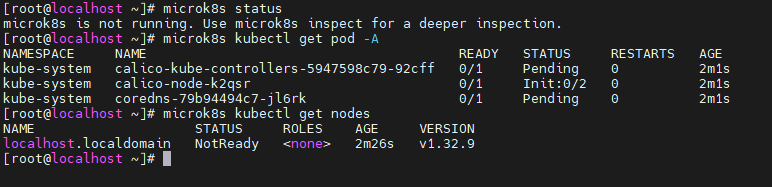
[root@localhost ~]# microk8s kubectl get pod -A
NAMESPACE     NAME                                       READY   STATUS    RESTARTS   AGE
kube-system   calico-kube-controllers-5947598c79-92cff   1/1     Running   0          12m
kube-system   calico-node-k2qsr                          1/1     Running   0          12m
kube-system   coredns-79b94494c7-jl6rk                   1/1     Running   0          12m
[root@localhost ~]# microk8s kubectl get nodes
NAME                    STATUS   ROLES    AGE   VERSION
localhost.localdomain   Ready    <none>   12m   v1.32.9
启用基础插件
[root@localhost ~]# microk8s enable dns Infer repository core for addon dns Addon core/dns is already enabled [root@localhost ~]# microk8s enable hostpath-storage Infer repository core for addon hostpath-storage Enabling default storage class. WARNING: Hostpath storage is not suitable for production environments. A hostpath volume can grow beyond the size limitsetin the volume claim manifest.
deployment.apps/hostpath-provisioner created storageclass.storage.k8s.io/microk8s-hostpath created serviceaccount/microk8s-hostpath created clusterrole.rbac.authorization.k8s.io/microk8s-hostpath created clusterrolebinding.rbac.authorization.k8s.io/microk8s-hostpath created Storage will be available soon. [root@localhost ~]# microk8s kubectl get sc NAME PROVISIONER RECLAIMPOLICY VOLUMEBINDINGMODE ALLOWVOLUMEEXPANSION AGE microk8s-hostpath (default) microk8s.io/hostpath Delete WaitForFirstConsumer false 5s
[root@localhost ~]# microk8s kubectl get nodes
NAME                    STATUS   ROLES    AGE   VERSION
localhost.localdomain   Ready    <none>   90m   v1.32.9

[root@localhost ~]# snap install microk8s --classic --channel=1.32
2026-01-21T23:43:08+08:00 INFO Waiting for automatic snapd restart...
Warning: /var/lib/snapd/snap/bin was not found in your $PATH. If you've not restarted your session
         since you installed snapd, try doing that. Please see https://forum.snapcraft.io/t/9469
         for more details.

microk8s (1.32/stable) v1.32.9 from Canonical✓ installed
[root@localhost ~]# hostnamectl set-hostname microk8s-worker
[root@microk8s-worker ~]# microk8s kubectl get nodes
NAME                    STATUS     ROLES    AGE     VERSION
localhost.localdomain   NotReady   <none>   2m41s   v1.32.9
worker节点配置镜像加速,参考上面
[root@microk8s-worker ~]# microk8s kubectl get nodes
NAME                    STATUS     ROLES    AGE     VERSION
localhost.localdomain   NotReady   <none>   7m34s   v1.32.9
microk8s-worker         Ready      <none>   2m44s   v1.32.9
[root@microk8s-worker ~]# microk8s remove-node localhost.localdomain
[root@microk8s-worker ~]# microk8s kubectl get nodes
NAME              STATUS   ROLES    AGE     VERSION
microk8s-worker   Ready    <none>   2m55s   v1.32.9
[root@microk8s-worker ~]# microk8s kubectl get pod -A
NAMESPACE     NAME                                       READY   STATUS     RESTARTS   AGE
kube-system   calico-kube-controllers-5947598c79-zp6wc   1/1     Running    0          7m41s
kube-system   calico-node-h2rzw                          1/1     Running    0          116s
kube-system   coredns-79b94494c7-zpd9n                   1/1     Running    0          7m41s
[root@localhost ~]# microk8s add-node
From the node you wish to join to this cluster, run the following:
microk8s join 192.168.213.110:25000/3261736fb5043b8367253a69ee907dc5/7f32c8813166

Use the '--worker' flag to join a node as a worker not running the control plane, eg:
microk8s join 192.168.213.110:25000/3261736fb5043b8367253a69ee907dc5/7f32c8813166 --worker

If the node you are adding is not reachable through the default interface you can use one of the following:
microk8s join 192.168.213.110:25000/3261736fb5043b8367253a69ee907dc5/7f32c8813166
在worker节点上操作如下:
[root@microk8s-worker ~]# microk8s kubectl get nodes NAME STATUS ROLES AGE VERSION microk8s-worker Ready <none> 4m3s v1.32.9 [root@microk8s-worker ~]# microk8s join 192.168.213.110:25000/3261736fb5043b8367253a69ee907dc5/7f32c8813166 --worker Contacting cluster at 192.168.213.110
The node has joined the cluster and will appear in the nodes list in a few seconds.
This worker node gets automatically configured with the API server endpoints. If the API servers are behind a loadbalancer please set the '--refresh-interval' to '0s'in: /var/snap/microk8s/current/args/apiserver-proxy and replace the API server endpoints with the one provided by the loadbalancer in: /var/snap/microk8s/current/args/traefik/provider.yaml
Successfully joined the cluster.
添加成功后,在110节点上查询
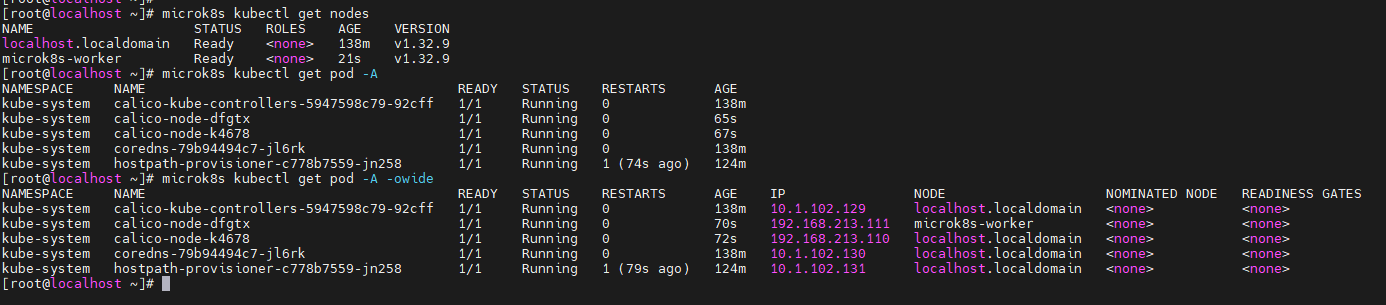
[root@localhost ~]# microk8s kubectl get nodes
NAME                    STATUS   ROLES    AGE    VERSION
localhost.localdomain   Ready    <none>   138m   v1.32.9
microk8s-worker         Ready    <none>   21s    v1.32.9

 微信 WeChat
 支付宝 Alipay